A client of ours in Surat had a five-star rated shop, a working website, and almost zero calls from Google. Turned out their Google Business Profile category was wrong, their address was spelled three different ways across the web, and they had 4 reviews total. That’s it. That’s the whole local SEO guide most business owners actually need fix what’s broken before chasing what’s fancy.
If you run a local business and Google Maps isn’t sending you customers, this is for you.
Quick Answer:
Local SEO is the process of optimising your online presence so your business shows up in Google Maps, the Local Pack, and “near me” searches. It comes down to three things Google checks relevance, distance, and prominence and you win by claiming your Google Business Profile, keeping your NAP consistent everywhere, collecting real reviews, and adding local content to your website.
Here’s the thing nobody tells beginners: you don’t need to rank #1 in organic search to get customers. You need to rank in the top 3 on Maps. That’s a completely different game, and this local SEO guide walks through exactly how to play it.
What Is Local SEO and How Is It Different from Regular SEO?
Regular SEO fights for a spot on page one of Google Search. Local SEO fights for a spot in the Local Pack that block of three business listings with a map that shows up when someone searches “plumber near me” or “dentist in Surat.”
Different battlefield. Different rules.
Traditional SEO cares about domain authority, backlinks, and content depth across the whole internet. Local SEO cares about whether your business is close to the searcher, whether it matches what they’re looking for, and whether Google trusts it enough to recommend it. You could have a weak website and still dominate Maps if your Google Business Profile and reviews are strong. I’ve seen it happen more than once.
And here’s what beginners miss a national keyword like “digital marketing agency” behaves nothing like “digital marketing agency in Surat.” The second one triggers Maps results. The first one usually doesn’t. So if you’re only optimising your website and ignoring your Google Business Profile, you’re fighting half the battle blind.
How Google Decides Local Rankings (Proximity, Relevance, Prominence)
Google has said this publicly for years: local rankings come down to three pillars relevance, distance, and prominence.
Relevance is whether your listing matches the search. Your primary category on Google Business Profile is the single biggest lever here more influential than almost anything else you can control.
Distance is exactly what it sounds like how close you are to the person searching, or to the location they typed. You can’t move your shop to change this, but you can stop it from being misread by keeping your address accurate.
Prominence is your reputation reviews, backlinks, citations, and how well-known your business is offline and online.
According to the Whitespark 2026 Local Search Ranking Factors survey, proximity accounts for roughly 55% of ranking decisions, with Google Business Profile signals contributing around 32% and reviews contributing 16-20%. So no you can’t out-SEO your way past a competitor who’s simply closer to the customer. But you can absolutely out-rank a closer competitor with weak GBP and no reviews. That’s the part worth focusing on.
One more thing worth knowing: Google’s own documentation confirms these same three factors relevance, distance, and prominence, with prominence also referred to as “popularity” drive local results across Search, Maps, and increasingly, AI-generated answers too.
Setting Up and Optimising Your Google Business Profile
This is where 80% of your local SEO effort should go. Not the website. Not backlinks. Your Google Business Profile (GBP).
Here’s the setup flow, step by step:
- Claim or create your listing at google.com/business.
- Choose your primary category with brutal precision “Personal Injury Lawyer,” not just “Lawyer.” “Emergency Plumber,” not just “Plumber.”
- Add every secondary category that genuinely applies.
- Fill in hours, services, attributes, and a keyword-natural business description.
- Upload real photos your storefront, your team, your work. Not stock images.
- Get verified (usually by postcard, phone, or video).
So why does the category matter this much? Because Google treats it as the strongest signal of what you actually do. A plumber listed under “Home Services” instead of “Plumber” is telling Google to rank them for the wrong searches entirely.
when we set up GBP for a client’s real estate business back in 2024, we initially left the category as the generic default WordPress-style “Real Estate Agency.” Three months, barely any Map visibility. We switched to a more specific category matching their actual niche plot and land sales and within five weeks they were appearing in the Local Pack for city-specific searches they’d never ranked for before. Same website. Same reviews. Just the category.
Keep your profile active too. Post updates, answer questions, respond to reviews. A stagnant profile quietly signals to Google that the business might not be reliable anymore.
Local Citations: What They Are and Where to Build Them
A citation is any online mention of your business name, address, and phone number even without a link. Think Justdial, Sulekha, Yellow Pages, industry directories, chamber of commerce sites.
Citations used to be a volume game. Not anymore. Citations remain important for validating business legitimacy, but consistency now matters more than volume fewer accurate, high-authority citations outperform mass directory submissions.
Where to actually build them:
- Google Business Profile (the big one)
- Bing Places
- Justdial, Sulekha (India-specific)
- Industry-specific directories relevant to your niche
- Local chamber of commerce or trade association listings
- Facebook Business Page
Don’t go signing up for 200 random directories in one weekend. Pick 15-20 that are actually relevant to your industry or city, and make sure every single one has identical NAP details.
How Reviews Impact Local SEO Rankings
Reviews aren’t a nice-to-have anymore they’re a ranking signal Google weighs directly, and one you can actually influence, unlike proximity.
Review signals account for roughly 16-20% of local ranking weight, and what matters most is review velocity getting new reviews consistently along with your response rate and total review count. A controlled study also found something interesting: a 9-week study tracking 441 keywords found zero ranking movement from Google Business Profile posts alone meaning posting updates helps engagement, but reviews and GBP completeness do the heavy lifting for rankings.
How many reviews do you actually need? There’s no magic number, but the goal is simple: match or beat your top 3 local competitors. If they average 80 reviews and you have 12, that gap is costing you visibility.
A few things that genuinely move the needle:
- Ask every satisfied customer directly in person, over WhatsApp, or via a follow-up email
- Respond to every review, good or bad, and mention the service and city in your reply
- Never buy fake reviews Google’s spam detection has gotten aggressive about this in 2026, and getting caught can mean profile suspension
Local On-Page SEO: NAP, Schema, and Location Pages
Your website still matters just not the way it does for traditional SEO. Three things carry the weight here.
NAP consistency. Your Name, Address, and Phone number must be identical same abbreviations, same formatting on your website, your GBP, and every citation. “St.” on one platform and “Street” on another sounds trivial, but it creates doubt in Google’s entity matching, and doubt costs rankings.
Local schema markup. Adding LocalBusiness schema to your site tells Google directly in a format it doesn’t have to guess at your address, hours, service area, and business type.
Location pages. If you serve more than one city, build a real page for each not a template with the city name swapped out. Cover local landmarks, local pricing context, and location-specific service details.
The keyword that should appear naturally through all of this your local SEO guide to on-page optimisation really comes down to accuracy over volume. Google doesn’t reward more pages. It rewards pages that are unmistakably, specifically about one real place.
How to Track Your Local SEO Performance
You can’t fix what you’re not measuring. Here’s what to check monthly:
- Google Business Profile Insights calls, direction requests, website clicks, and search queries that triggered your listing
- Local Pack ranking trackers tools that check your position for target keywords across different neighbourhoods, not just your office address
- Review count and rating trend are you gaining reviews faster or slower than last quarter?
- Google Search Console for tracking which local queries actually bring organic traffic to your site (we go deeper into setup in our Google Search Console guide)
Set a recurring monthly check. Twenty minutes, same day every month. That’s honestly all it takes to catch a slipping ranking before it becomes a real problem.
Local SEO Tool Comparison
| Tool | Best For | Free or Paid | Difficulty | Rating |
|---|---|---|---|---|
| Google Business Profile | Core listing management | Free | Easy | 5/5 |
| BrightLocal | Rank tracking + citation audits | Paid | Medium | 4.5/5 |
| Whitespark | Citation building + NAP checks | Paid | Medium | 4/5 |
| Moz Local | NAP consistency checker | Freemium | Easy | 4/5 |
| Google Search Console | Organic local query tracking | Free | Medium | 4.5/5 |
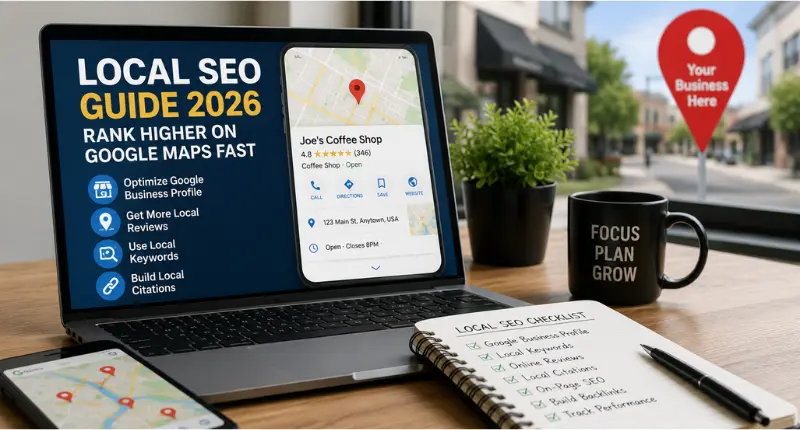
Local SEO Checklist (Bonus)
- Google Business Profile claimed, verified, fully filled out
- Primary category matches your exact core service
- NAP identical across website, GBP, and citations
- 15-20 relevant, accurate local citations built
- Active review request process in place
- LocalBusiness schema added to website
- Location page created for each city served
- Monthly GBP Insights + Search Console review scheduled
Frequently Asked Questions
Q: What is local SEO and why is it important?
A: Local SEO is the practice of optimising your online presence so your business appears in Google Maps and local search results. It’s important because 76% of people who search for something nearby on their smartphone visit a related business within a day, and 28% of those searches result in a purchase meaning local visibility directly drives real customers.
Q: How do I rank my business on Google Maps?
A: Claim and fully optimise your Google Business Profile with the correct category, keep your NAP consistent everywhere online, build accurate local citations, collect genuine reviews consistently, and add location-specific content to your website.
Q: How many reviews do I need for local SEO?
A: There’s no fixed number. The real benchmark is your top 3 local competitors match or exceed their review count and response rate, and keep new reviews coming in steadily rather than in one big burst.
Q: What is NAP and why does consistency matter?
A: NAP stands for Name, Address, and Phone number. Google cross-checks these details across your website, Google Business Profile, and citations to confirm your business is legitimate inconsistencies create doubt and can quietly hurt your rankings.
Q: Is local SEO free or do I need to pay?
A: The core of local SEO claiming your Google Business Profile, requesting reviews, fixing NAP consistency is completely free. Paid tools like BrightLocal or Whitespark just speed up tracking and citation building; they’re optional, not required.

Founder, Digi Segment
SEO Strategist & Digital Marketing Expert
Hardik Vaghani is a digital marketing professional and SEO strategist based in Surat, Gujarat, India. He founded Digi Segment to share practical, experience-backed insights, case studies, and step-by-step guides on SEO, digital marketing, AI tools, and online growth strategies.
With hands-on experience across Search Engine Optimisation, Technical SEO, Google Ads, Meta Ads, and Content Strategy, Hardik has worked with businesses across e-commerce, real estate, healthcare, home improvement, and solar industries to improve organic visibility, local rankings, and lead generation through ethical, white-hat strategies.
He specialises in Core Web Vitals optimisation, on-page SEO, keyword research aligned with search intent, and building scalable content frameworks that rank.
Expertise: SEO | Technical SEO | Google Ads | Meta Ads | LinkedIn Ads | Pinterest Ads | ChatGPT Ads | Content Strategy | Core Web Vitals | WordPress | Digital Marketing | Lead Generation | Local SEO