Three thousand rupees a day, gone in under a week, and not one phone call. That’s what a home improvement client showed me the first time we met a Google Ads account somebody had “set up quickly” for them, running broad match keywords with no negative keyword list. It happens constantly. And it’s exactly why so many people searching for Google Ads for beginners end up more confused after their first campaign than before it.
I’m Hardik Vaghani. I run HV Digital Marketing out of Surat, and I hold Google’s own Ads Search Certification. So this isn’t theory pulled from a course I skimmed it’s the process I use every week for real clients in e-commerce, healthcare, real estate, and home services. This guide walks you through the exact setup, from account creation to your first conversion report, written for someone who has never touched Google Ads before.
Quick Answer:
Google Ads for beginners means learning four things in order choosing the right campaign type, picking keywords that match real search intent, writing ad copy that earns the click, and tracking conversions so you know what’s working. Skip conversion tracking, and you’re basically flying blind with your own money.
Why “Google Ads for Beginners” Feels Overwhelming (And Where People Actually Go Wrong)
You open the platform for the first time and it throws Smart Bidding, Performance Max, Quality Score, and ad rank at you before you’ve even picked a keyword. Honestly? Most beginners don’t fail because they picked the wrong keyword. They fail because nobody explained the order of operations first.
Here’s the pattern I see with almost every new advertiser trying to figure out Google Ads for beginners on their own: they set a budget, throw in some broad keywords, write one ad, and hope. No negative keywords. No conversion tracking. Then three weeks later they tell me “Google Ads doesn’t work for my business.” It’s not that it doesn’t work. It’s that it was never actually set up to work.
What Is Google Ads for Beginners? How the Platform Actually Works
Google Ads is Google’s pay-per-click advertising platform. You bid on keywords, and when someone searches for those terms, your ad can appear above the organic results. You only pay when someone clicks not for the impression itself.
Under the hood, every ad shown is decided by an auction. Google combines your bid with something called Ad Rank, and Ad Rank includes Quality Score a 1-to-10 diagnostic score based on expected click-through rate, ad relevance, and landing page experience. Google’s own Ads Help Center guide to Quality Score describes it as a diagnostic tool for comparing your ad quality against other advertisers, not a direct auction input. A higher score generally means a lower cost per click for the same ad position. That’s the whole game, really relevance wins, not just the biggest budget.
So does that mean a small business with a small budget can’t compete against a big brand? Not at all. I’ve seen a two-person solar installer outrank a national chain on local searches simply because their ad copy and landing page matched the search intent better.
Types of Google Ads Campaigns (Search, Display, Shopping, Video)
Before you touch keywords, you need to pick a campaign type. This decision shapes everything downstream.
- Search campaigns text ads on Google’s search results page. Best for high-intent buyers actively looking for what you sell.
- Display campaigns visual banner ads across millions of partner websites. Better for awareness than immediate conversions.
- Shopping campaigns product listings with image, price, and store name, pulled from a product feed. Built for e-commerce.
- Video campaigns ads on YouTube, priced by view or action.
My take: if you’re following a Google Ads for beginners approach with a limited budget, start with Search. It’s the most forgiving campaign type to learn on because the intent signal is already there someone typed the exact thing they want.
| Campaign Type | Best For | Cost Model | Difficulty | Beginner Rating |
|---|---|---|---|---|
| Search | High-intent buyers | Cost-per-click | Easy | 5/5 |
| Shopping | E-commerce products | Cost-per-click | Medium | 4/5 |
| Display | Brand awareness | CPC / CPM | Medium | 3/5 |
| Video | Storytelling, reach | Cost-per-view | Hard | 2/5 |
How to Set Up a Google Ads Account Step by Step
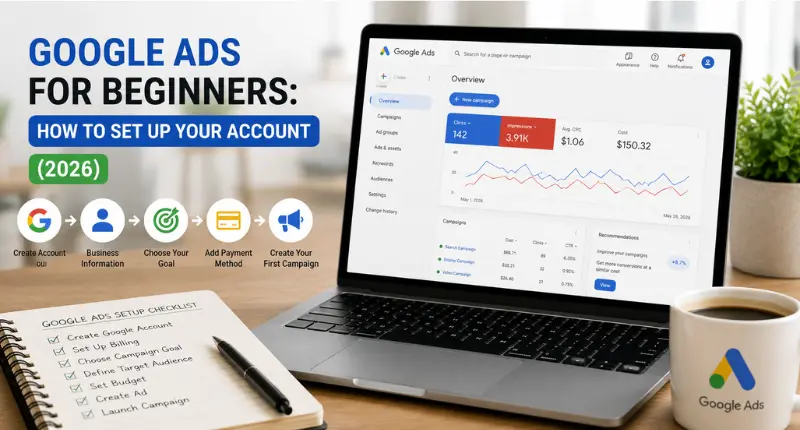
Here’s the full Google Ads for beginners workflow, in the order I actually use it with clients:
- Create your Google Ads account at ads.google.com and link it to a Google Ads Manager account if you plan to run more than one.
- Choose your campaign type Search, for most beginners.
- Set your budget as a daily average, not a hard daily cap (Google can spend up to 2x on a strong day and balances it monthly).
- Do keyword research more on this below.
- Write your ad copy headlines, descriptions, and extensions.
- Set your bid strategy start with Manual CPC or Maximize Clicks before trusting full automation.
- Add conversion tracking the Google tag or Google Tag Manager, before you spend a single rupee.
- Launch and check performance daily for the first week.
The result is a campaign built in the right order, not stitched together after the fact.
Keyword Match Types: Broad, Phrase, and Exact Explained
This is the single biggest mistake I see in every Google Ads for beginners audit. Match type controls how closely a search has to match your keyword before your ad shows.
- Broad match widest reach, shows for related searches too. Cheap to set up, expensive if left unmanaged, because Google’s interpretation of “related” can wander.
- Phrase match shows for searches that include the meaning of your phrase, in roughly that order.
- Exact match tightest control, shows for searches that closely match the specific term or its meaning.
Should you use broad match or exact match? Honestly, I’ve changed my mind on this over the years. I used to push exact match for every beginner account. Now I mostly recommend phrase match to start, with a strong negative keyword list, and broad match only once you’ve got Smart Bidding and enough conversion data feeding it. That’s where we covered building the right term list in our guide to keyword research for beginners it’s worth doing before you ever open the campaign builder.
How to Write High-Converting Ad Copy
For anyone still learning Google Ads for beginners, ad copy is where the biggest quick wins live. Ad copy for Google Ads has hard character limits Headlines: 30 characters each (up to 15 headlines). Descriptions: 90 characters each (up to 4 descriptions). Miss these and Google simply won’t accept the asset.
Sample template (bonus tip):
Headline 1 (30 char): Affordable Solar Installers
Headline 2 (30 char): Free Site Survey This Week
Headline 3 (30 char): Surat’s Trusted Solar Team
Description 1 (90 char): Get a free quote in 24 hours. Government subsidy guidance included. Book now.
Description 2 (90 char): 500+ installations completed. Licensed, insured, and locally based since 2020.
Weak ad copy sounds like: “We are the best solar company, contact us today.” That tells the reader nothing. Strong copy names the specific outcome and includes a reason to act now. It’s also worth reading our full advertising copy guide if you want the deeper framework behind this.
Setting Your Budget and Bidding Strategy
Budgeting is where most Google Ads for beginners give up too early. What’s the minimum budget for Google Ads? There isn’t an official floor, but under ₹300–500 a day rarely generates enough clicks to learn anything useful. I generally tell beginners to plan for at least 4–6 weeks of consistent spend before judging results, because Google’s algorithm needs conversion data to optimise properly.
For bidding, start manual or with “Maximize Clicks” for the first two weeks. Once you have 15–30 conversions logged, switch to Target CPA or Target ROAS. Jumping straight into automated bidding with zero data is like handing a new driver the keys and no instructions it might work, but you’re gambling.
How to Track Conversions and Measure Campaign Performance
This is the step almost every Google Ads for beginners tutorial skips. Set up conversion tracking before launch, not after. Define what counts as a conversion a form fill, a call, a purchase and install the Google tag on that confirmation page. Without this, you’re optimising toward guesses, not data.
According to WordStream’s 2026 benchmarks drawn from over 13,000 search advertising campaigns the average click-through rate across industries sits at 6.64%, average cost per click at $5.42, and average conversion rate at 8.18%. See the full WordStream 2026 Google Ads Benchmarks report for industry-specific figures. Your numbers won’t match these exactly, and that’s fine. Use them as a rough compass, not a scorecard.
My Take
I set up my first client campaign back in 2023 a local plumbing business with a ₹15,000 monthly budget. First two weeks were rough. We had clicks, almost no calls, and I nearly told the client to pull the plug. Turned out the landing page was the problem, not the ads. We swapped a generic homepage link for a dedicated page with the phone number above the fold and a same-day service badge. Calls went from 2 a week to 11 within a month. That’s when it clicked for me Google Ads for beginners isn’t really about the ads. It’s about everything the click lands on afterward too.
I won’t pretend every account turns around that fast. Some niches, especially ones with long research cycles like real estate, take longer to show clear ROI. I’m upfront with clients about that from day one.
Real Results: A Quick Case Study for Google Ads Beginners
We took on a home improvement client running broad match with zero negative keywords and a flat ₹500/day budget. Within the first month of rebuilding the account phrase match keywords, three ad variations per group, conversion tracking on quote requests cost per lead dropped by roughly 40%, and lead volume nearly doubled. No budget increase. Just structure.
Frequently Asked Questions
Q: How much does Google Ads cost to start?
A: There’s no signup fee you only pay when someone clicks your ad. For most Google Ads for beginners in India, testing starts around ₹500–1,500 a day, though your actual cost per click depends heavily on your industry and competition.
Q: What is Quality Score and how does it affect my ads?
A: Quality Score is a 1–10 diagnostic rating Google gives each keyword, based on expected click-through rate, ad relevance, and landing page experience. A higher score can lower your cost per click and improve your ad position for the same bid.
Q: What is the minimum budget for Google Ads?
A: There’s no official minimum, but under ₹300–500 daily rarely generates enough clicks to gather useful data. Most beginners need at least 4–6 weeks of steady spend before the algorithm can optimise properly.
Q: How long does it take to see results from Google Ads?
A: Expect a learning phase of roughly 2–4 weeks before performance stabilises. Simple lead-generation businesses often see early signals within the first two weeks; considered purchases like real estate can take longer.
Q: Should I use broad match or exact match keywords?
A: Start with phrase match and a solid negative keyword list. Move to broad match once you have enough conversion data feeding Smart Bidding, and reserve exact match for your highest-value, best-performing terms.
Go Deeper
If you’re building your paid strategy as part of a broader Google Ads for beginners plan, these guides pair well with this one:
- Get your keyword list right before you build a single ad group Keyword Research for Beginners
- Sharpen the copy inside every ad group Advertising Copy: Meaning, Elements, Types, and Real Examples
- See how paid and organic fit together in a full strategy What Is Digital Marketing?
- Running a local business? Pair Search campaigns with Local SEO Guide 2026
- Add email follow-up to your paid leads Email Marketing for Beginners in India
If this Google Ads for beginners walkthrough saved you from making the same ₹3,000-in-a-week mistake that client made, HV Digital Marketing sets up and manages Google Ads accounts for small businesses across India reach out if you’d rather have someone build it right the first time.
Editor Note: Add Hardik Vaghani’s full bio block here photo, title, credentials (Google Ads Search Certification, AI Visibility Essentials with Semrush), years of experience, link to LinkedIn (linkedin.com/in/hv018). Required before publishing.
Hardik Vaghani is the founder of Digi Segment and HV Digital Marketing, based in Surat, Gujarat. Since 2023, he has managed Google Ads and SEO campaigns for clients across e-commerce, real estate, healthcare, home improvement, and solar, and holds Google’s Ads Search Certification along with certifications from Semrush and Coursera.

Founder, Digi Segment
SEO Strategist & Digital Marketing Expert
Hardik Vaghani is a digital marketing professional and SEO strategist based in Surat, Gujarat, India. He founded Digi Segment to share practical, experience-backed insights, case studies, and step-by-step guides on SEO, digital marketing, AI tools, and online growth strategies.
With hands-on experience across Search Engine Optimisation, Technical SEO, Google Ads, Meta Ads, and Content Strategy, Hardik has worked with businesses across e-commerce, real estate, healthcare, home improvement, and solar industries to improve organic visibility, local rankings, and lead generation through ethical, white-hat strategies.
He specialises in Core Web Vitals optimisation, on-page SEO, keyword research aligned with search intent, and building scalable content frameworks that rank.
Expertise: SEO | Technical SEO | Google Ads | Meta Ads | LinkedIn Ads | Pinterest Ads | ChatGPT Ads | Content Strategy | Core Web Vitals | WordPress | Digital Marketing | Lead Generation | Local SEO