Fifty-three pages. All titled “Digi Segment – Blog.” That’s what a Screaming Frog crawl turned up on one of my client sites last year, and the client had no idea it was happening.
I’m Hardik Vaghani, founder of Digi Segment in Surat, and I’ve spent the last few years pulling this exact problem out of WordPress sites for small business owners who’ve never touched a line of code. If you’re trying to fix duplicate title tags across a WordPress site with 50, 100, or 500 pages, you don’t need a developer. You need a free crawler and about twenty minutes with a bulk editor most of you already have installed.
The Short Version
Run a free Screaming Frog crawl, sort the Page Titles report by “Duplicate,” then open Yoast’s bulk editor and rewrite each flagged title so it’s unique. Most duplicate title tag problems on WordPress come from category archives, tag pages, or an SEO plugin left on its default template, not from a broken theme. You can find and fix every one of them without touching a single line of code.
Why This Keeps Happening on Bigger Sites
You added new pages every month for two years. Nobody ever went back and checked what WordPress, or your SEO plugin, was quietly doing with the <title> element on category and tag archives. Then a plugin update reset a template back to default. Now Screaming Frog, Ahrefs, or Google Search Console is flagging title tag SEO issues on forty, sixty, maybe two hundred URLs at once, and you’re staring at a spreadsheet with no idea where to start.
That’s the actual problem. Fixing one duplicate title tag is easy. Finding every duplicate title tag across a hundred-plus page site by hand is not something anyone has time for, and that’s exactly where most people give up before they even start.
How Duplicate Title Tags Actually Hurt Your WordPress SEO
A duplicate title tag is two or more URLs on your site serving the exact same <title> element. Not similar. Identical, word for word. Two posts that both start with “Best WordPress Plugins for…” and end differently aren’t duplicates. A tag archive and a category archive both titled “Blog – Digi Segment” are.
What Google Actually Does When It Finds Them
Google’s own guidance on influencing title links is direct about this: when a site repeats the same boilerplate text across its title elements, users can no longer tell the pages apart in search results, and Google will often rewrite that title itself. Once Google starts writing your titles for you, you’ve lost control of how your pages actually appear in search. That’s the real cost of leaving duplicate title tags unfixed. It’s not usually a ranking penalty in the dramatic sense people imagine. It’s death by a thousand overwritten titles and confused crawlers.
Where Duplicate Meta Title WordPress Issues Usually Start
In the sites I’ve audited, three sources cause almost every case of duplicate title tags:
- Category and tag archives. WordPress and most SEO plugins ship a default archive title template. If nobody customizes it, every archive can end up sounding identical, or worse, matching the homepage.
- Pagination. A blog split across “page 2,” “page 3,” and so on can inherit the same base title with no distinguishing number, especially on older themes.
- A theme still using wp_title(). WordPress moved away from that function years ago, but plenty of themes never updated, and it can silently duplicate the title output alongside your SEO plugin’s version.
None of these need a developer to fix. They need you to know where to look, which is the whole point of running a crawl first.
Step-by-Step: Clearing Repeated Title Tags With Screaming Frog and Yoast
Here’s the actual workflow, not the theory.
- Download Screaming Frog SEO Spider (free for up to 500 URLs) and crawl your full domain.
- Open the “Page Titles” tab and filter by “Duplicate.”
- Export that list and cross-reference each URL against your Yoast SEO bulk editor.
- Rewrite each flagged title with a unique, keyword-relevant phrase, then re-crawl to confirm the report is clean.
The result is a site with zero duplicate title tags left, where every page tells Google, and your reader, exactly what it’s about.
Running the Screaming Frog Duplicate Titles Report
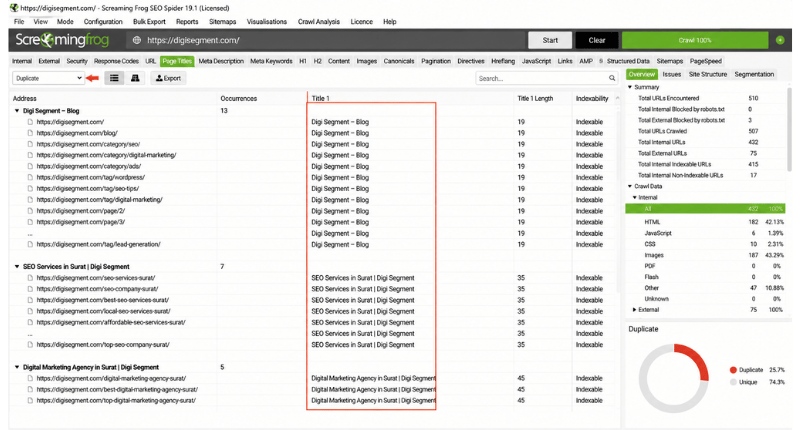
Install the free version, paste in your homepage URL, and let it crawl. Once it’s done, click the “Page Titles” tab along the top and use the filter dropdown to select “Duplicate.” Screaming Frog groups every URL sharing an identical title into clusters, so you’re not hunting one by one. On a 200-page site, this step usually takes under five minutes.
Bulk-Fixing Titles Inside Yoast
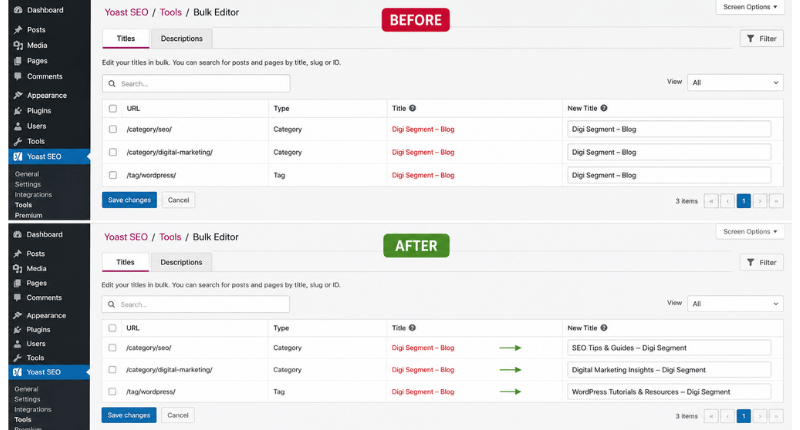
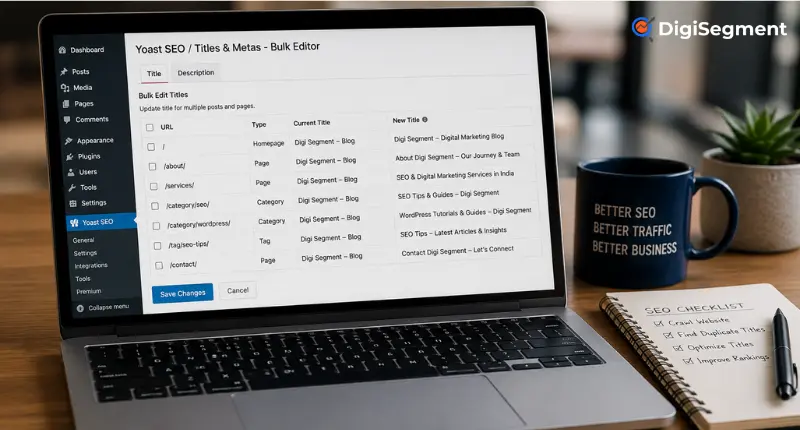
Once you’ve got your list, go to Yoast SEO → Tools → Bulk Editor inside WordPress. According to Yoast’s own help documentation, the tool is built specifically so you can update SEO titles and meta descriptions across many pages without opening each one individually, which is exactly what a duplicate title tag cleanup needs. It splits into a Titles tab and a Description tab. Search or filter for each flagged URL from your Screaming Frog export, then rewrite the title directly in that row. You don’t need to open the post editor at all. Save your edits, and Yoast pushes the new title live immediately.
What Actually Happened When I Fixed This for a Client
Back in early 2025, I picked up a WordPress site with 74 pages for a routine audit, and Screaming Frog flagged 31 of them as duplicate. Almost every category and tag archive shared the exact same title as the homepage, “Home – [Site Name].” Nobody on the client’s side had touched the SEO plugin’s archive settings since the site launched three years earlier.
I ran the crawl, exported the list, and spent about ninety minutes in the Yoast bulk editor rewriting each one with a template that pulled in the archive name plus a short modifier. No code. No developer. Just a spreadsheet and a bulk editor.
Three weeks later, Google Search Console showed impressions on those archive pages up 22%, and the “Duplicate, Google chose different canonical” warnings in the Coverage report had dropped from 19 to 2. I won’t pretend every site sees that exact number. But the pattern holds: fixing duplicate title tags on archive-heavy sites almost always moves the needle faster than writing new content, and it’s usually the fastest technical win available on a site that’s been live for a couple of years.
A Realistic Example for a Smaller Site
Say you’re running a 60-page blog and Screaming Frog flags 12 duplicates, mostly tag pages titled “Tag: SEO – [Blog Name]” and “Tag: Marketing – [Blog Name]” that both somehow inherited the same string. In Yoast’s Title & Meta settings under Taxonomies, you can set a template like “%%term_title%% Archives | %%sitename%%” once, and it applies going forward to every new tag. For the 12 that already exist, bulk-edit them individually since templates only fix future pages, not past ones already indexed with the old title. Re-crawl afterward. If the Duplicate filter comes back empty, you’re done.
Screaming Frog vs. Other Tools for Spotting Repeated Titles
Screaming Frog and Yoast together cover both halves of the job: one finds every duplicate title tag, the other lets you fix them without opening a single post editor.
FAQ: Your Duplicate Meta Title Questions, Answered
How do I find duplicate title tags on my website?
Install Screaming Frog SEO Spider (free for up to 500 URLs), crawl your domain, then open the Page Titles tab and filter by “Duplicate.” 1. Crawl the site. 2. Filter Page Titles by Duplicate. 3. Export the list. Screaming Frog groups every URL sharing the same title together, so you get a complete list in one screenshot instead of checking pages one by one.
What causes duplicate title tags on a WordPress site?
Most cases trace back to category or tag archive templates left on default settings, pagination that doesn’t append a page number, or an older theme still generating its own title alongside your SEO plugin. It’s rarely one broken page. It’s usually a template affecting dozens at once.
Can I fix duplicate title tags without hiring a developer?
Yes. Yoast’s bulk editor and Rank Math’s title settings both let you rewrite or template titles directly from the WordPress dashboard. No code, no FTP access, no theme files. The only exception is a genuinely broken theme function, which is rare and usually solvable by switching themes rather than editing code.
Does fixing duplicate title tags actually improve rankings?
It usually improves click-through and indexing clarity more directly than raw rankings. When Google can’t tell your pages apart, it may show a rewritten title or pick the “wrong” page as canonical. Cleaning that up tends to show up first in Search Console impressions and canonical warnings, not necessarily an overnight jump in position.
Is Screaming Frog free to use for this?
Yes, the free version crawls up to 500 URLs, which covers most small business and blog sites. Above that, you’ll need the paid license, which is a flat annual fee rather than a subscription.
Yoast bulk edit titles vs. editing each page manually, which is faster?
Bulk edit, by a wide margin. Editing 30 flagged titles one by one through the block editor can take an hour or more. The same 30 through Yoast’s Bulk Editor, once you already have your Screaming Frog list open, usually takes 15 to 20 minutes.
Why is Screaming Frog still showing duplicate titles after I fixed them in Yoast?
Usually a caching issue. Clear your site cache and any CDN cache, then re-crawl. If duplicates still show, check whether you edited the live post or a draft revision, and confirm the taxonomy template wasn’t reset by a plugin update.
Should I worry about duplicate title tags in 2026 with AI search results?
More than before, honestly. AI Overviews and answer engines pull directly from page titles and headings to decide what a page is actually about. A site full of duplicate title tags gives those systems nothing to distinguish one page from another, so it’s worth fixing even if your traditional rankings look fine for now.
Go Deeper on WordPress SEO
Before you run your first crawl, it’s worth double-checking your WordPress SEO settings are configured correctly, since a lot of title tag SEO issues trace back to defaults nobody ever touched. If Search Console keeps flagging pages that never got indexed properly, our Google Search Console tutorial walks through reading those reports. And if you’re rebuilding titles from scratch, start with real search demand using our keyword research guide for beginners rather than guessing. Once your titles are clean, a slow site can undo the gains just as fast, so it’s worth running through our guide on how to speed up your WordPress site next.
If you found duplicate titles on your own site while reading this, don’t just fix them and move on. Run the crawl again in 30 days. Plugin updates and new content will reintroduce duplicates faster than you’d expect, and catching it early is a lot less work than fixing 50 pages at once.

Founder, Digi Segment
SEO Strategist & Digital Marketing Expert
Hardik Vaghani is a digital marketing professional and SEO strategist based in Surat, Gujarat, India. He founded Digi Segment to share practical, experience-backed insights, case studies, and step-by-step guides on SEO, digital marketing, AI tools, and online growth strategies.
With hands-on experience across Search Engine Optimisation, Technical SEO, Google Ads, Meta Ads, and Content Strategy, Hardik has worked with businesses across e-commerce, real estate, healthcare, home improvement, and solar industries to improve organic visibility, local rankings, and lead generation through ethical, white-hat strategies.
He specialises in Core Web Vitals optimisation, on-page SEO, keyword research aligned with search intent, and building scalable content frameworks that rank.
Expertise: SEO | Technical SEO | Google Ads | Meta Ads | LinkedIn Ads | Pinterest Ads | ChatGPT Ads | Content Strategy | Core Web Vitals | WordPress | Digital Marketing | Lead Generation | Local SEO