Your site’s been live for twelve days. Zero impressions in Search Console. Not even a “crawled, not indexed” status. Just silence.
I’m Hardik Vaghani, founder of Digi Segment, and I watch this exact scenario play out on almost every new client site I onboard at HV Digital Marketing. If you’re trying to get new a website indexed faster on Google, sitemap submission alone won’t get you there. You need three things working together: a clean sitemap, manual URL Inspection requests, and internal linking that actually gives Googlebot a reason to come back. I’ve tracked indexing speed on real launches, and the gap between a site that sits invisible for six weeks and one that shows up in nine days usually comes down to exactly these three moves.
The Short Version
To get website indexed faster, submit your XML sitemap in Google Search Console, then manually request indexing on your 5 to 10 most important URLs through the URL Inspection tool. Follow that with internal links pointing to every new page from one Google already crawls often. Do all three in the first 48 hours and most sites get indexed faster, often within one to two weeks instead of four to six.
Why Is My New Website Not Indexed?
You published five pages. You checked site:yourdomain.com on Google and got nothing back. Search Console shows “Discovered – currently not indexed” and it’s been sitting there for two weeks straight, and you’re starting to wonder if your new site will ever get indexed at all.
You didn’t do anything wrong technically. Your robots.txt is clean, there’s no noindex tag, and the content isn’t thin. Google just doesn’t know your domain is worth visiting yet – and on a brand-new site, that trust has to be built before you can get indexed faster.
Why New Websites Take So Long to Get Indexed
Google Doesn’t Know Your Site Exists Yet
A brand-new domain has no crawl history. Googlebot has never fetched a single page from it, so there’s no established pattern telling the crawler how often to come back. Per Google’s own how Search works documentation, Google must first discover a URL exists before it can crawl or index it – and discovery on a fresh domain is usually what determines whether a new website gets indexed quickly or sits waiting for weeks.
Crawl Budget Works Against Brand-New Domains
Established sites with regular traffic and backlinks get crawled constantly, which is exactly why they index new pages fast. A new domain with zero backlinks and zero history sits low on the priority list. This isn’t a penalty. It’s just math – Googlebot allocates more resources to sites it already trusts, and that’s the whole reason getting a new website indexed faster takes deliberate work instead of just waiting.
And here’s the thing – waiting it out rarely gets you indexed faster. I’ve seen sites sit at “Discovered – currently not indexed” for two months with nothing changing, simply because nobody manually pushed the pages forward.
Submit Your Sitemap So Google Finds Every Page
Sitemap submission is where most people stop, and it’s also why so many new sites don’t get indexed faster on their own. A sitemap tells Google what exists. It doesn’t make Google prioritize it.
Generate a Clean XML Sitemap
If you’re on WordPress, Yoast SEO or Rank Math generate this automatically at /sitemap_index.xml or /sitemap.xml. Check it loads in a browser before submitting anything. A broken sitemap will slow down indexing, not help you get indexed faster.
Submit It Inside Google Search Console
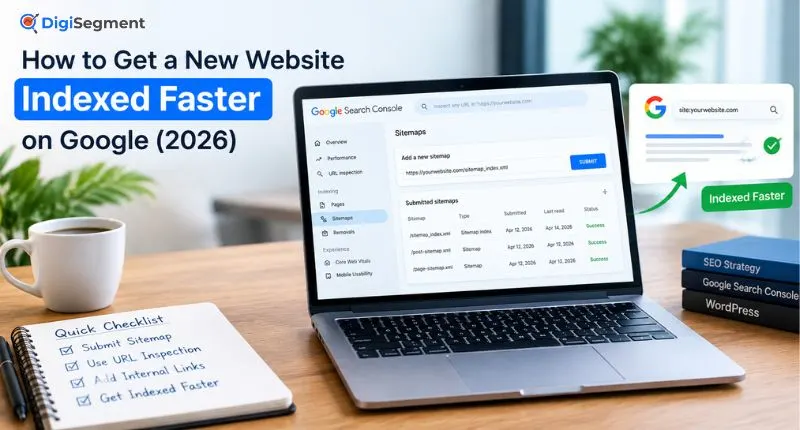
Go to Search Console, open the Sitemaps report under Indexing, and paste your sitemap URL. This is the fastest way to get your new site’s full URL list in front of Google in one shot instead of relying on Googlebot to stumble onto pages through links.
Fix “Couldn’t Fetch” Errors Before You Delay Indexing Further
If Search Console throws a “Couldn’t fetch” error, check that the sitemap isn’t blocked in robots.txt and that it returns a 200 status code, not a redirect. Most fetch errors I see on new sites trace back to a caching plugin serving a stale sitemap – and every day that error sits unfixed is a day you’re not getting indexed faster.
Submitting a sitemap tells Google what exists. It doesn’t guarantee indexing – Google’s documentation is explicit that indexing isn’t guaranteed for any page, sitemap or not. Sitemap submission gets you discovered faster. On its own, though, it rarely gets a brand-new site indexed faster than a few weeks.
Use URL Inspection to Get Your New Pages Indexed Fast
This single tool is the fastest way I know to get specific new pages indexed faster, and most site owners trying to get their website indexed faster never even touch it.
Request Indexing One URL at a Time
Open the URL Inspection tool in Search Console, paste the exact URL, and click “Request Indexing.” This pushes that specific page into a priority crawl queue instead of waiting for Googlebot to find it organically through the sitemap – it’s the single fastest lever for getting a new page indexed quickly.
Do this for your homepage, your top 5 to 10 category or service pages, and anything you want ranking soon. Don’t burn requests trying to get every blog tag archive indexed faster – prioritize.
Know the Daily Limit Before You Hit It
Google caps individual URL Inspection requests at roughly 10 to 12 per property per day. Hit the limit and the button greys out for 24 hours, which slows down how fast you can get the rest of your new site indexed. I keep a simple list ranked by priority so I’m never wasting a slot on a page that isn’t worth getting indexed faster.
5 Ways to Speed Up Indexing With Internal Links
Link From Pages Google Already Visits Often
Your homepage almost certainly gets crawled more than any other page on a new site. Every new post should get at least one link from the homepage, a category page, or another already-indexed post within the first week – it’s often the single fastest way to get a new page indexed.
A Simple Internal Linking Trick for Brand-New Sites
I add a “Latest Guides” block to the homepage footer on every new client site. It’s ugly, honestly. But it means every new URL is one click from the most-crawled page on the domain, and that alone has helped client launches get indexed faster, sometimes by more than a week.
Internal links don’t just help users navigate. They hand Googlebot a path, and a path is usually what’s missing when a new website isn’t getting indexed fast enough on sitemap submission alone.
The 5-Step Process I Use to Get New Pages Indexed Faster
This is the exact sequence I run whenever I need to get a client’s new website indexed faster than the default four-to-six week wait.
- Verify the domain in Search Console and submit the XML sitemap.
- Request indexing on the homepage and top 5-10 priority URLs through URL Inspection.
- Add internal links from the homepage or a high-traffic page to every new URL.
- Publish a fresh page or post within the first week to give Googlebot a reason to return.
- Check the Pages report every 3-4 days and re-request indexing on anything still stuck.
The result is most pages moving from “Discovered” to “Indexed” within 7 to 14 days – which is how you actually get a new website indexed faster instead of sitting untouched for a month.
The 19-Day Indexing Timeline From a Real Client Launch
Say you’re launching a new site for a home services client – this is close to a real launch I ran in February 2026 for a client in exactly that space, and it’s the clearest before/after example I have of getting a new site indexed faster. Nine pages went live on day one. No backlinks yet, no aged domain, nothing to lean on.
I submitted the sitemap on day one. By day four, Search Console still showed all nine pages as “Discovered – currently not indexed.” Nothing indexed faster, nothing changed. That’s normal, and it’s the point where most site owners panic and start reading forum threads about penalties. There wasn’t one.
On day five I manually ran URL Inspection requests on the five highest-priority pages and added homepage links to all nine. By day 9, three pages had flipped to “Indexed.” By day 14, seven were in – proof the combination was working, not just sitemap submission alone. The last two – both thin service pages with under 200 words – didn’t index until day 19, and only after I rewrote them with more actual content.
What changed wasn’t luck. It was manual requests plus internal links plus one round of content fixes that finally got the site indexed faster. Sitemap submission alone, on its own, had done almost nothing by day four. That’s the whole playbook for getting a new website indexed faster in practice, not just in theory.
What the Data Actually Says About Indexing Speed
Google has never published a fixed indexing SLA, and its own crawling and indexing documentation confirms indexing depends on crawl demand and site quality signals, not a set schedule. There’s no universal switch that gets every website indexed faster – some of it depends on factors outside your control.
That said, if you want to get a website indexed faster, the data patterns are still worth knowing. Google Search Advocate John Mueller has said most high-quality content typically gets indexed within about a week, and separate analysis found roughly 83% of pages get indexed within their first week. Industry timeline studies from 2026 put brand-new domains in a 1-to-4-week band for initial indexing, stretching to 2-3 months for full-site coverage on larger sites – which is exactly the gap the steps above are meant to close.
None of that means you’re stuck waiting the full four weeks to get indexed. Even with unpredictable Google timelines, there are still reliable ways to get indexed faster than the average new site. The pages in my own 19-day example sat at zero for four days, then moved fast once I stopped waiting and started pushing.
Sitemap Submission vs URL Inspection vs Internal Links
| Method | Best For | Speed | Effort |
|---|---|---|---|
| Sitemap Submission | Telling Google every URL exists at once | Slow alone (days-weeks) | Low |
| URL Inspection Request | Getting priority pages indexed faster right now | Fast (often 1-9 days) | Medium (manual, capped daily) |
| Internal Linking | Giving Googlebot a crawl path long-term | Medium, compounds over time | Low-Medium |
Use all three together. Picking the right combination, not just one method, is how you actually get a new website indexed faster instead of guessing and waiting.
FAQ
Q. What does it mean for a website to be indexed by Google?
A. Indexed means Google has crawled your page, stored its content in the Search index, and made it eligible to appear in results. Indexed doesn’t guarantee ranking – it just means the page is in the pool Google can pull from, which is the whole reason it’s worth learning how to get a website indexed faster in the first place.
Q. How do you get a new website indexed faster?
A. Submit your XML sitemap in Search Console, manually request indexing on your priority URLs through URL Inspection, and add internal links from a frequently-crawled page like your homepage. Doing all three together, not just one, is what actually gets a new website indexed faster.
Q. Why Is My New Website Not Showing Up on Google? (Quick Checklist)
A. Run through this before assuming something’s broken:
- No sitemap submitted in Search Console yet
- No internal links pointing to the new page from an already-crawled page
- Thin or duplicate content on the page itself
- A robots.txt block or accidental noindex tag
- It’s simply too early – Google hasn’t gotten around to it yet
Most of the time it’s the last one, but check the first four before you wait it out – fixing them is usually what gets a new website indexed faster than patience alone.
Q. How long does Google actually take to index a new site in 2026?
A. There’s no fixed timeline. Established, high-authority pages can index within hours. Brand-new domains typically take 1 to 4 weeks to get indexed for initial pages, sometimes longer for full-site coverage. Pushing manual requests and internal links usually pulls that down to under two weeks.
Q. Is sitemap submission enough on its own?
A. Not usually. It tells Google what exists, but on a brand-new domain with no crawl history, that alone often isn’t enough to get indexed faster. Pair it with URL Inspection requests and internal links.
Q. What’s the daily limit on URL Inspection requests?
A. Around 10 to 12 individual requests per property per day. Google doesn’t publish the exact number, and it can vary slightly by site history.
Q. Sitemap submission vs URL Inspection – which gets you indexed faster?
A. URL Inspection is faster for the specific pages you request, often within a matter of days. Sitemap submission is broader but slower on its own. Use sitemap submission for full-site discovery and URL Inspection when you need specific pages indexed faster.
Q. Do backlinks help a brand-new site get indexed?
A. Yes. A single backlink from an already-indexed, frequently-crawled page can get a new URL indexed faster than waiting on the sitemap alone. It’s not required to get a website indexed faster, but it helps, especially in the first few weeks.
Go Deeper
Once your new pages are indexed, the next problem is usually structural. We covered sitemap and crawl basics in more depth in our Google Search Console guide, and if titles are duplicating across pages, our guide on fixing duplicate title tags walks through the exact fix. If you’re setting up a brand-new WordPress site from scratch, our WordPress SEO settings guide covers what to configure before you even submit a sitemap. And if this is your first blog altogether, start with how to start a blog in India for the full setup path.
If you’re stuck past the two-week mark and nothing’s moving, that’s usually a signal something deeper is off – thin content, a crawl block, or a technical issue Search Console isn’t flagging clearly.

Founder, Digi Segment
SEO Strategist & Digital Marketing Expert
Hardik Vaghani is a digital marketing professional and SEO strategist based in Surat, Gujarat, India. He founded Digi Segment to share practical, experience-backed insights, case studies, and step-by-step guides on SEO, digital marketing, AI tools, and online growth strategies.
With hands-on experience across Search Engine Optimisation, Technical SEO, Google Ads, Meta Ads, and Content Strategy, Hardik has worked with businesses across e-commerce, real estate, healthcare, home improvement, and solar industries to improve organic visibility, local rankings, and lead generation through ethical, white-hat strategies.
He specialises in Core Web Vitals optimisation, on-page SEO, keyword research aligned with search intent, and building scalable content frameworks that rank.
Expertise: SEO | Technical SEO | Google Ads | Meta Ads | LinkedIn Ads | Pinterest Ads | ChatGPT Ads | Content Strategy | Core Web Vitals | WordPress | Digital Marketing | Lead Generation | Local SEO